Email marketing remains one of the most effective digital marketing strategies, offering businesses, creators, and individuals a direct channel to engage with their audience, build relationships, and drive conversions. However, the success of an email campaign hinges on the ability to measure and optimize its performance. This is where email marketing metrics come into play. Metrics provide actionable insights into how subscribers interact with emails, allowing marketers to assess campaign effectiveness, identify areas for improvement, and align strategies with goals. For students, small business owners, or creators with limited resources, understanding the most important metrics is crucial for maximizing impact without wasting time or budget. This essay explores the key email marketing metrics, their significance, how to interpret and act on them, challenges in tracking, and provides a practical example to illustrate their application.
Why Email Marketing Metrics Matter
Email marketing metrics are quantitative measures that reflect the performance of email campaigns. They help answer critical questions, such as:
- Are subscribers opening emails?
- Are they engaging with the content?
- Are emails driving desired actions, like purchases or signups?
- Are campaigns compliant and avoiding spam filters?
By tracking these metrics, marketers can:
- Optimize Campaigns: Identify what works (e.g., compelling subject lines) and what doesn’t (e.g., low click-through rates).
- Improve ROI: Email marketing yields an average ROI of $36 for every $1 spent (Litmus, 2024), but only with data-driven optimization.
- Enhance Subscriber Experience: Tailor content to audience preferences, reducing churn and boosting engagement.
- Ensure Compliance: Monitor spam complaints to maintain a positive sender reputation and adhere to regulations like GDPR and CAN-SPAM.
For students or beginners, focusing on the most impactful metrics simplifies the process, enabling effective campaigns even with free or low-cost tools like Mailchimp or MailerLite.
The Most Important Email Marketing Metrics
Below are the key email marketing metrics, their definitions, significance, and target benchmarks based on industry standards (e.g., Mailchimp, Campaign Monitor, 2024).
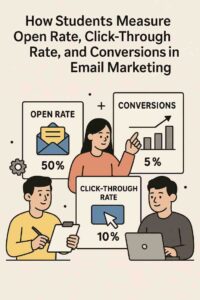
1. Open Rate
- Definition: The percentage of recipients who open an email, calculated as (Unique Opens ÷ Emails Delivered) × 100.
- Significance: The open rate indicates how compelling your subject line, sender name, and timing are. It reflects initial engagement and deliverability, as unopened emails can’t drive further actions. Low open rates may signal issues like poor subject lines, irrelevant content, or spam folder placement.
- Benchmark: Average open rates range from 20-30% across industries, with higher rates (30-40%) for highly targeted lists.
- Actionable Insights:
- Test subject lines (e.g., “5 Study Tips” vs. “Ace Your Exams”) to boost opens.
- Optimize send times based on audience behavior (e.g., Tuesday mornings for B2C).
- Improve deliverability by cleaning lists and authenticating domains (SPF, DKIM, DMARC).
2. Click-Through Rate (CTR)
- Definition: The percentage of recipients who click a link in the email, calculated as (Unique Clicks ÷ Emails Delivered) × 100.
- Significance: CTR measures how engaging and relevant the email content is, reflecting the effectiveness of calls-to-action (CTAs), design, and messaging. A high CTR indicates subscribers are interested and taking action (e.g., visiting a blog or making a purchase).
- Benchmark: Average CTRs range from 5-10%, with targeted campaigns achieving 10-15%.
- Actionable Insights:
- Use clear, action-oriented CTAs (e.g., “Read Now” vs. “Click Here”).
- Enhance content relevance through segmentation and personalization.
- Test email layouts, button designs, or link placement to increase clicks.
3. Conversion Rate
- Definition: The percentage of recipients who complete a desired action after clicking a link, such as purchasing, signing up, or downloading, calculated as (Conversions ÷ Emails Delivered) × 100.
- Significance: The conversion rate ties directly to campaign goals, measuring ROI and effectiveness. It’s the ultimate indicator of whether emails drive meaningful outcomes, not just engagement.
- Benchmark: Conversion rates vary widely (2-5% average), depending on the goal (e.g., e-commerce purchases vs. webinar signups).
- Actionable Insights:
- Align CTAs with landing pages to ensure a seamless user journey.
- Use urgency or incentives (e.g., “Limited Spots!”) to boost conversions.
- Track conversions via email platform integrations or Google Analytics.
4. Bounce Rate
- Definition: The percentage of emails that fail to reach the recipient’s inbox, calculated as (Bounced Emails ÷ Emails Sent) × 100. Bounces are either hard (permanent, e.g., invalid address) or soft (temporary, e.g., full inbox).
- Significance: A high bounce rate harms deliverability and sender reputation, as ESPs may flag senders with frequent bounces. Hard bounces indicate poor list quality, while soft bounces may reflect temporary issues.
- Benchmark: Aim for a bounce rate below 2%, with hard bounces under 0.5%.
- Actionable Insights:
- Remove hard bounces immediately to maintain list hygiene.
- Use double opt-in to verify email addresses during signup.
- Monitor soft bounces and resend emails if issues persist.
5. Unsubscribe Rate
- Definition: The percentage of recipients who opt out of the email list, calculated as (Unsubscribes ÷ Emails Delivered) × 100.
- Significance: The unsubscribe rate reflects subscriber satisfaction and content relevance. A high rate suggests emails are too frequent, irrelevant, or misaligned with expectations set during signup.
- Benchmark: Average unsubscribe rates are 0.1-0.5%, with rates above 1% indicating issues.
- Actionable Insights:
- Set clear expectations during signup (e.g., “Weekly tips every Monday”).
- Offer a preference center to adjust frequency or content type.
- Analyze unsubscribe spikes to identify problematic campaigns.
6. Spam Complaint Rate
- Definition: The percentage of recipients who mark an email as spam, calculated as (Spam Complaints ÷ Emails Delivered) × 100.
- Significance: Spam complaints damage sender reputation, reduce deliverability, and risk ESP penalties or blacklisting. They often result from unexpected emails, lack of consent, or irrelevant content.
- Benchmark: Keep spam complaints below 0.1%, as rates above 0.2% can trigger ESP restrictions.
- Actionable Insights:
- Use double opt-in to ensure consent.
- Include a visible unsubscribe link to reduce spam reports.
- Avoid spammy language (e.g., “FREE!!!”) in subject lines or content.
7. List Growth Rate
- Definition: The rate at which the email list grows, calculated as [(New Subscribers – Unsubscribes – Bounces) ÷ Total Subscribers] × 100.
- Significance: A healthy list growth rate ensures a sustainable audience, offsetting natural attrition (unsubscribes, bounces). It reflects the effectiveness of list-building strategies, like lead magnets or signup forms.
- Benchmark: Aim for 1-3% monthly growth, depending on campaign scale.
- Actionable Insights:
- Offer compelling lead magnets (e.g., “Free Study Guide”) to attract subscribers.
- Promote signup forms across channels (e.g., blog, social media, QR codes).
- Re-engage inactive subscribers to reduce churn.
8. Revenue Per Email (RPE)
- Definition: The average revenue generated per email sent, calculated as Total Revenue ÷ Emails Sent.
- Significance: RPE is critical for monetized campaigns (e.g., e-commerce, affiliate marketing), directly measuring financial impact. It helps prioritize high-value campaigns and optimize ROI.
- Benchmark: Varies by industry; e-commerce RPE ranges from $0.10-$0.50 per email.
- Actionable Insights:
- Segment lists to target high-value customers with personalized offers.
- Test promotional content (e.g., discount vs. free shipping) to maximize revenue.
- Integrate with e-commerce platforms to track sales attribution.
Challenges in Tracking Email Metrics
- Data Overload: Beginners may feel overwhelmed by the volume of metrics. Focus on open rate, CTR, and conversion rate to start.
- Inaccurate Data: Poor list hygiene or tracking setup (e.g., missing UTM codes) can skew results. Use double opt-in and analytics integrations.
- Attribution Complexity: Multi-channel campaigns make it hard to attribute conversions solely to email. Use tracking links and CRM tools.
- Time Constraints: Students or small creators may lack time to analyze metrics. Automate reports via platforms like Mailchimp or schedule weekly reviews.
- Platform Limitations: Free plans may lack advanced analytics (e.g., Mailchimp’s free plan omits detailed click maps). Upgrade or use Google Analytics for deeper insights.
Best Practices for Using Email Metrics
- Set Clear Goals: Align metrics with objectives (e.g., open rate for awareness, conversion rate for sales).
- Use a Reliable Platform: Tools like Mailchimp, ConvertKit, or MailerLite provide robust analytics, even on free plans.
- Segment Your Audience: Analyze metrics by segment (e.g., new vs. engaged subscribers) for targeted insights.
- Test Continuously: A/B test subject lines, CTAs, or send times to improve performance (e.g., 10% open rate lift from testing).
- Monitor Trends: Compare metrics over time to identify patterns (e.g., declining open rates may signal content fatigue).
- Act on Insights: Low CTR? Revise content. High unsubscribes? Reduce frequency or adjust messaging.
- Ensure Compliance: Monitor spam complaints and unsubscribes to maintain a positive sender reputation and comply with GDPR, CAN-SPAM, and CASL.
Example of Tracking Email Metrics
Scenario:
Emma, a senior business student, runs a blog, “Entrepreneur’s Edge,” sharing startup tips for young entrepreneurs. She uses Mailchimp’s free plan to grow her email list and promote affiliate products (e.g., online courses). Emma tracks key metrics to optimize her campaigns and increase affiliate revenue.
Implementation:
- Goals and Audience:
- Goals: Drive blog traffic, grow affiliate revenue, maintain engagement.
- Audience: College students, early-career professionals, aspiring entrepreneurs.
- Campaign Setup:
- Signup Form: Offers a lead magnet, “Startup Checklist for Beginners,” promoted on her blog, LinkedIn, and university entrepreneurship club.
- Email Types:
- Welcome Series: 3 emails over 10 days (lead magnet delivery, blog post, affiliate course pitch).
- Weekly Newsletter: Sent every Wednesday with a startup tip, blog link, and occasional affiliate promotion.
- Re-Engagement: Quarterly email for inactive subscribers with a new lead magnet.
- Automation: Welcome series and re-engagement emails are automated via Mailchimp.
- Metrics Tracked:
- Open Rate: Target 25%. Emma tests subject lines (e.g., “Startup Tip #5” vs. “This Changed My Business Plan”) to boost opens.
- Click-Through Rate: Target 8%. She uses one clear CTA (e.g., “Read the Post”) and tracks clicks to blog and affiliate links.
- Conversion Rate: Target 3%. Tracks affiliate course signups via unique tracking links.
- Bounce Rate: Target <2%. Uses double opt-in to verify addresses and removes hard bounces monthly.
- Unsubscribe Rate: Target <0.5%. Monitors spikes after promotional emails.
- Spam Complaint Rate: Target <0.1%. Ensures consent and visible unsubscribe links.
- List Growth Rate: Target 2% monthly. Promotes signup form via social media and QR codes at campus events.
- Revenue Per Email: Target $0.15. Tracks affiliate revenue via Mailchimp’s e-commerce integration.
- Technical Setup:
- Emma configures SPF and DKIM for deliverability.
- She uses UTM codes for blog and affiliate links to track conversions in Google Analytics.
- Emails are mobile-optimized, with short paragraphs and clear CTAs.
- Monitoring and Optimization:
- Emma reviews Mailchimp’s weekly reports, focusing on open rate, CTR, and conversions.
- After noticing a 15% open rate for newsletters, she tests personalized subject lines (e.g., “[Name], Try This Startup Hack”), increasing opens to 28%.
- A 4% CTR prompts her to simplify CTAs, boosting clicks to 9%.
- A 0.7% unsubscribe rate after a promotional email leads her to reduce affiliate pitches to once every 6 weeks.
- She maintains a 1% bounce rate by cleaning her list monthly and achieves zero spam complaints with double opt-in.
- List growth reaches 2.5% monthly, adding 50 subscribers to her 2,000-subscriber list in two months.
- Affiliate conversions yield $300, with an RPE of $0.18, exceeding her target.
Outcome:
- Emma’s welcome series achieves a 35% open rate, 12% CTR, and 5% conversion rate, driving 20 course signups.
- Weekly newsletters maintain a 28% open rate and 9% CTR, increasing blog traffic by 30%.
- Re-engagement emails reactivate 15% of inactive subscribers, reducing churn.
- Total affiliate revenue grows to $300 in two months, with metrics guiding optimizations that boost ROI by 25%.
Conclusion
The most important email marketing metrics—open rate, click-through rate, conversion rate, bounce rate, unsubscribe rate, spam complaint rate, list growth rate, and revenue per email—provide a comprehensive view of campaign performance. They enable marketers to optimize content, improve deliverability, and achieve goals, from engagement to revenue. For students like Emma, focusing on these metrics with free tools like Mailchimp simplifies the process while delivering measurable results. Despite challenges like data overload or attribution complexity, consistent monitoring and testing ensure campaigns remain effective. Emma’s example shows how a student can leverage metrics to grow an audience and monetize a blog, highlighting the power of data-driven email marketing. As the landscape evolves, these metrics will remain essential for maximizing impact and building sustainable connections.