Introduction
A/B testing—also known as split testing—is a powerful method to compare two or more variations of your ads, landing pages, or targeting strategies to determine which version performs better. In Google Ads, A/B testing allows marketers to make data-driven decisions by experimenting with different components of a campaign and then measuring which variant yields better results in terms of CTR (click-through rate), conversion rate, cost-per-click (CPC), or return on ad spend (ROAS). By running structured A/B tests, you can continuously refine and optimize your campaigns for improved performance.
What Is A/B Testing in Google Ads?
A/B testing in Google Ads involves creating two versions (A and B) of a campaign element—like ad copy, headlines, keywords, landing pages, or bidding strategies—and showing them to similar audiences under the same conditions. You then analyze the performance metrics to identify which variation leads to better results.
Why Use A/B Testing in Google Ads?
– It helps identify what resonates most with your target audience
– Reduces wasted ad spend by eliminating low-performing variants
– Increases conversion rates and ROI over time
– Minimizes guesswork and assumptions in campaign decisions
– Helps maintain consistent performance improvements
What Can You A/B Test in Google Ads?
-
Ad Copy: Different headlines, descriptions, CTAs
-
Landing Pages: Variations in layout, messaging, offer
-
Ad Formats: Responsive search ads vs. expanded text ads
-
Targeting: Different audience segments or keyword match types
-
Bidding Strategies: Manual CPC vs. Target ROAS
-
Ad Scheduling: Weekday vs. weekend performance
-
Device Targeting: Desktop vs. mobile users
-
Geography: Different regions or cities
How to Set Up A/B Testing in Google Ads
Method 1: Using Ad Variations (For Text Ads)
Google Ads provides an Ad Variations tool under the “Experiments” section.
Steps:
-
Go to Tools & Settings → Drafts & Experiments → Ad Variations
-
Click the + button to create a new ad variation
-
Choose the campaign(s) you want to test
-
Select the variation type (e.g., change headline, description, display URL)
-
Set the experiment split (usually 50/50)
-
Define a start and end date
-
Launch the experiment and monitor performance
This is ideal for testing small text changes without affecting your existing ad structure.
Method 2: Using Campaign Drafts and Experiments
Campaign Drafts and Experiments allow you to test deeper elements such as bidding strategies, targeting, or ad scheduling.
Steps:
-
Navigate to your campaign → Click on “Drafts”
-
Create a draft from your existing campaign
-
Modify elements in the draft (change bidding, targeting, etc.)
-
Save the draft and click “Run as Experiment”
-
Set the traffic split (e.g., 50% control, 50% experiment)
-
Monitor performance metrics under “Experiments”
This method is ideal for testing strategic changes that could impact the campaign at a broader level.
Method 3: Manual A/B Testing Within Campaigns
If you want more flexibility or test assets not supported by Ad Variations, you can set up manual A/B tests.
Steps:
-
Create two identical ad groups or campaigns
-
Change one variable (e.g., headline or audience)
-
Set equal budget and bids
-
Track KPIs like CTR, conversion rate, cost per conversion
-
Let the test run for at least 7–14 days
-
Analyze results and apply learnings
Best Practices for A/B Testing in Google Ads
– Test One Variable at a Time: Don’t change multiple elements in one test. You won’t know which change affected the result.
– Run the Test Long Enough: Give the test enough time to gather statistically significant data—at least 7–14 days, depending on traffic volume.
– Maintain Equal Budgets and Settings: To ensure fairness, keep other variables constant, including location, device, and schedule.
– Use Statistical Tools: Use Google’s built-in stats or tools like Google Analytics or Optimizely to validate your test.
– Segment Your Results: Analyze results by device, location, or audience to understand deeper insights.
– Use Clear Goals: Define your success metric beforehand (CTR, cost per conversion, ROAS, etc.)
Example: A/B Testing by Zara – Ad Copy Optimization
Zara wants to run a Google Ads campaign to promote its summer collection. They run two different ads:
Ad A
Headline: “Shop Zara Summer Dresses – Flat 40% Off”
Description: “Limited Time Offer on Zara’s Latest Styles. Free Shipping Available.”
Ad B
Headline: “Zara’s New Summer Collection – Free Shipping”
Description: “Discover Fresh Summer Looks. Up to 40% Off Online Only!”
Both ads are shown equally to the same audience for 14 days. After the test:
– Ad A has a CTR of 4.2% and conversion rate of 2.8%
– Ad B has a CTR of 3.6% and conversion rate of 3.3%
Zara chooses to scale Ad B because although the CTR was slightly lower, the conversion rate and ROAS were higher.
Example: A/B Testing by MakeMyTrip – Landing Page Variations
MakeMyTrip runs a Google Ads campaign targeting “Weekend Getaway Deals.” They create two landing pages:
Page A: Lists top 10 weekend getaways with a generic CTA
Page B: Features Goa, with pricing and urgency: “Only 5 Rooms Left – Book Today!”
Results after 10 days:
– Page A conversion rate: 3.5%
– Page B conversion rate: 5.9%
– Bounce rate lower on Page B
MakeMyTrip switches their landing page to B and applies similar urgency tactics to other pages.
Benefits of A/B Testing in Google Ads
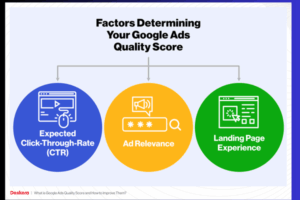
– Improves ad relevance and Quality Score
– Lowers cost-per-click (CPC) through better engagement
– Increases conversion rates and ROAS
– Identifies audience preferences and behavior patterns
– Allows for better resource allocation
– Enhances long-term campaign profitability
Common Mistakes to Avoid
– Testing too many variables at once
– Ending the test too soon without enough data
– Making decisions based on vanity metrics like impressions
– Ignoring external factors like seasonality or competitor actions
– Forgetting to exclude past visitors in remarketing tests
Conclusion
A/B testing is one of the most effective optimization strategies in Google Ads. By continuously testing ad copy, landing pages, targeting methods, and strategies, you ensure your campaigns evolve with audience behavior and market changes. Whether you’re a fashion brand like Zara or a travel platform like MakeMyTrip, structured A/B testing helps you make smart decisions based on real data. The key is to be consistent, patient, and analytical in your testing process—always focused on the metric that drives your business goals.