Autoresponders are among the most powerful tools in email marketing, allowing marketers and businesses to automatically send emails to subscribers based on specific triggers or events. These messages are usually pre-written and scheduled to go out in a sequence or immediately after an action, providing consistent communication without requiring manual intervention. This functionality enhances user experience, improves customer retention, and allows businesses to scale their email marketing efforts efficiently.
What is an Autoresponder?
An autoresponder is an email marketing feature that automatically sends pre-designed emails to subscribers based on predefined rules or triggers. It functions as an automated communication system that can send out welcome emails, follow-ups, thank-you notes, product recommendations, reminders, or promotional messages without requiring any manual action after the initial setup.
Autoresponders are built into most email marketing platforms such as Mailchimp, ConvertKit, GetResponse, ActiveCampaign, AWeber, and others. They help nurture leads, maintain relationships, and move subscribers along the marketing funnel.
The Core Mechanism of Autoresponders
To understand how autoresponders work, let’s explore their components and how they are configured within an email marketing platform.
1. Trigger Event
The autoresponder begins when a trigger event takes place. A trigger is the specific action or condition that initiates the sending of an automated email. Common triggers include:
-
A user subscribes to a mailing list
-
A customer makes a purchase
-
A subscriber clicks on a specific link in a previous email
-
A cart is abandoned in an eCommerce store
-
A specific date is reached (e.g., birthday or subscription anniversary)
These triggers are defined by the user (business or marketer) based on the goals of the email sequence.
2. Email Content Creation
Once the trigger is defined, the next step is creating the email content. The email may include text, images, links, product recommendations, or attachments. Some platforms offer templates to speed up this process, and emails can be personalized using fields like the recipient’s name, location, or behavior history.
For example:
Subject: Welcome to Our Family, [First Name]!
Body: Thank you for joining us! We’re excited to have you here. Here’s a 10% discount just for signing up. Use code WELCOME10 at checkout.
This personalized content increases engagement and builds stronger relationships with subscribers.
3. Timing and Scheduling
Autoresponders allow marketers to define the timing of when emails are sent. There are generally two types of autoresponders:
-
Immediate Autoresponders: Sent right after the trigger event. For example, a welcome email sent immediately after someone signs up.
-
Drip Campaigns (Sequential Autoresponders): A series of emails sent over a specific time interval. For instance, an onboarding sequence that delivers one email per day for a week.
This ensures subscribers receive relevant information at the right time, increasing the likelihood of interaction and conversion.
4. Email List Segmentation
Most email software platforms offer segmentation features, allowing autoresponders to target specific groups within a list based on user behavior, demographics, or other criteria. For instance, users who clicked a link in a past email may be segmented into a “high-engagement” group and sent more targeted messages.
Segmentation improves open and click-through rates by sending the most relevant content to each subset of subscribers.
5. Automation Rules and Logic
Advanced autoresponders incorporate conditional logic or automation workflows. These allow you to set “if/then” scenarios. For example:
-
If a user opens the first email and clicks a link → send Email 2A.
-
If the user doesn’t open → send a reminder email 2B after 48 hours.
This intelligent logic helps customize the subscriber journey and optimize engagement.
6. Delivery and Monitoring
Once an autoresponder is triggered, the email is sent through the platform’s email server. Afterward, most software platforms provide detailed analytics such as:
-
Open rate
-
Click-through rate (CTR)
-
Bounce rate
-
Unsubscribes
-
Conversion metrics (like purchases or downloads)
This feedback loop helps marketers refine their campaigns, improve subject lines, adjust content, or modify timing.
Example: Autoresponder for an Online Course
Let’s imagine an online business offering a free 7-day email course on digital marketing. Here’s how the autoresponder would work:
Step 1: Trigger
A user visits the website and signs up for the free course using a subscription form.
Step 2: Email Series Creation
The business prepares 7 emails covering different aspects of digital marketing:
-
Day 1: Welcome + Introduction
-
Day 2: Understanding SEO Basics
-
Day 3: Content Marketing Strategies
-
Day 4: Social Media for Branding
-
Day 5: Email Marketing Tips
-
Day 6: Analytics and Performance
-
Day 7: Advanced Tools and Final Thoughts
Step 3: Automation and Scheduling
The autoresponder is configured to send:
-
Email 1 immediately after signup
-
The next six emails once every 24 hours
Step 4: Personalization and Segmentation
Each email includes the user’s first name, and users who click on specific tools or links are tagged to receive additional recommendations at the end of the course.
Step 5: Reporting and Optimization
The business monitors the campaign to identify which days have the highest open rates, which topics generate the most clicks, and whether the final call-to-action (e.g., purchasing a full course) is converting effectively.
Benefits of Using Autoresponders
Autoresponders offer several benefits for businesses of all sizes:
1. Save Time and Effort
Once configured, autoresponders operate automatically, reducing the need for manual follow-ups. This allows marketing teams to focus on strategy, content, and customer engagement.
2. Ensure Consistent Communication
With autoresponders, you can ensure that every new subscriber receives the same onboarding experience. It standardizes communication and ensures important messages are not forgotten.
3. Boost Engagement and Nurture Leads
Autoresponders help you build relationships by providing useful and relevant information over time. You can educate, entertain, and inform users in a gradual, non-intrusive manner.
4. Increase Sales and Conversions
Autoresponders can guide users through the sales funnel with timely and persuasive messages. By building trust and showcasing value, they increase the likelihood of purchase or conversion.
5. Improve User Experience
When users receive timely responses—such as a thank-you email, confirmation of an order, or a follow-up with relevant content—it enhances their experience and perception of your brand.
Types of Autoresponder Use Cases
Here are several real-world uses of autoresponders in various sectors:
1. Welcome Series
Sent after a new user subscribes. It typically introduces the brand, offers an incentive (like a discount or free eBook), and sets expectations.
2. Abandoned Cart Emails
For eCommerce businesses, autoresponders can remind users who added products to their cart but didn’t complete the purchase.
3. Lead Nurturing Series
Used in B2B marketing, a sequence of educational emails can nurture leads over several weeks until they are ready to convert.
4. Product Recommendations
Based on previous purchases or browsing behavior, autoresponders can suggest similar or complementary products.
5. Re-engagement Campaigns
If a user has not interacted with emails in a long time, an autoresponder series can attempt to re-capture their interest with new offers or surveys.
6. Event Reminders and Follow-ups
Autoresponders can remind users about upcoming webinars, workshops, or events, and send thank-you emails or recordings afterward.
Challenges and Best Practices
While autoresponders are powerful, they must be used strategically to avoid pitfalls.
Challenges
-
Over-automation: Users may feel disconnected if the emails are too robotic or generic.
-
Spam filters: Poorly designed autoresponders may be marked as spam.
-
Unsubscribes: Irrelevant or too-frequent emails can annoy users.
-
Complex setup: Setting up workflows with multiple conditions can be confusing for beginners.
Best Practices
-
Personalize emails as much as possible.
-
Keep emails concise, valuable, and engaging.
-
Use clear calls-to-action (CTAs).
-
Test subject lines and content.
-
Monitor metrics and optimize accordingly.
-
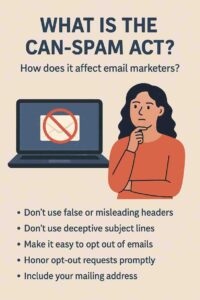
Respect unsubscribe requests and stay compliant with laws like GDPR and CAN-SPAM.
Conclusion
Autoresponders are a fundamental tool in modern email marketing, enabling marketers to communicate efficiently and personally with their audience. By using triggers, personalized content, timing controls, and automation logic, businesses can deliver timely and relevant messages that drive engagement, improve customer retention, and boost conversions.
Whether it’s welcoming a new subscriber, nurturing a lead, reminding someone about an abandoned cart, or simply wishing them a happy birthday—autoresponders automate it all. Their ability to function silently in the background while adding immense value to the user experience makes them indispensable in any digital marketing strategy. With proper setup and thoughtful execution, autoresponders can become one of the most effective assets in any business’s marketing toolkit.