Introduction
Email marketing remains one of the most cost-effective and powerful digital marketing channels, offering high returns when done correctly. However, as email inboxes become increasingly crowded, sending the same message to everyone no longer works. To engage subscribers meaningfully, marketers must deliver content that feels relevant, personalized, and timely.
That’s where email segmentation based on user behavior comes into play.
Segmenting your email list allows you to tailor content to specific groups of subscribers based on how they interact with your brand. When you understand what users are doing—or not doing—you can target them with messages that address their interests, challenges, and stage in the customer journey.
This article explores:
-
What behavioral segmentation is
-
Why it matters
-
Key types of behavior to track
-
Strategies to segment based on behavior
-
Tools and automation platforms
-
A real-world example of how behavioral segmentation boosts results
What Is Behavioral Segmentation in Email Marketing?
Behavioral segmentation involves dividing your email subscribers into groups based on how they interact with your emails, website, products, or services. These behaviors give insights into what users care about, helping you send emails that resonate with each segment.
Unlike basic demographic segmentation (age, gender, location), behavioral segmentation is dynamic and adapts to user actions in real time.
Why Behavioral Segmentation Matters
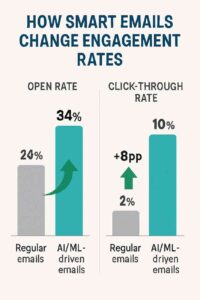
According to Mailchimp, segmented email campaigns result in:
-
14.3% higher open rates
-
100%+ more clicks
-
9.4% fewer unsubscribes
Behavioral segmentation allows marketers to:
-
Improve open and click-through rates
-
Reduce email fatigue and unsubscribes
-
Deliver more relevant content
-
Increase conversions and sales
-
Build stronger customer relationships
Key Types of User Behaviors for Email Segmentation
Let’s explore the most important types of user behavior you can track and segment emails around.
✅ 1. Email Engagement Behavior
This includes:
-
Opens
-
Clicks
-
Replies
-
Forwards
-
Unsubscribes
Segments you can create:
-
Highly engaged users (opened/clicked multiple times)
-
Inactive users (haven’t opened any emails in 30+ days)
-
Clicked on a specific link (e.g., clicked a product page link)
✅ 2. Website Behavior
If your email platform integrates with your website or uses cookies, you can track:
-
Page visits (e.g., blog posts, pricing page)
-
Time spent on a page
-
Downloads (e.g., eBooks or guides)
-
Form submissions
Segments you can create:
-
Visited the “Pricing” page but didn’t convert
-
Downloaded a lead magnet
-
Viewed a specific blog category
✅ 3. Purchase Behavior (for eCommerce)
This includes:
-
Past purchases
-
Product views
-
Cart additions or abandonments
-
Frequency and average order value
Segments:
-
First-time buyers
-
Repeat customers
-
Cart abandoners
-
High-spending customers
-
Browsed but never purchased
✅ 4. App or Product Usage (for SaaS or tools)
If you offer a digital product or service:
-
Active users vs. inactive users
-
Features used vs. not used
-
Trial signups
-
Upgrades or downgrades
Segments:
-
Used a feature for the first time
-
Hasn’t used the app in 7+ days
-
Upgraded to a premium plan
✅ 5. Survey or Poll Responses
Segment users based on how they respond to feedback surveys, quizzes, or polls. This is especially useful for content creators or educators.
Segments:
-
Interested in tutorials vs. product reviews
-
Beginners vs. advanced learners
-
Selected a topic preference in a quiz
How to Segment Emails Based on User Behavior
Here’s a step-by-step guide to building and using behavioral segmentation effectively.
Step 1: Choose a Behavioral Goal
Start with a specific objective. Examples include:
-
Re-engaging inactive users
-
Promoting products to high-interest users
-
Encouraging trial users to upgrade
-
Sending targeted content based on interests
Step 2: Define the Behavioral Criteria
Use measurable actions to define the segment. Examples:
| Segment | Criteria |
|---|---|
| Engaged Readers | Opened 3+ emails in the last 30 days |
| Product Researchers | Clicked “Features” or “Pricing” page |
| Cart Abandoners | Added item to cart but didn’t check out |
| First-Time Visitors | Visited homepage but no further action |
Step 3: Set Up Triggers or Filters
Using your email service provider (ESP), set up automated filters or segments based on the chosen behaviors.
Platforms like Mailchimp, ConvertKit, Brevo, ActiveCampaign, and MailerLite allow you to create:
-
Dynamic segments
-
Automated email workflows
-
Tags and scoring systems
Step 4: Craft Personalized Emails
Once you have segments, create email content tailored to each group.
Example for Cart Abandoners:
-
Subject: “Did you forget something?”
-
Body: “We noticed you left these items in your cart. Still interested? They’re waiting for you.”
-
CTA: “Complete Your Purchase”
Example for Highly Engaged Readers:
-
Subject: “You’re one of our top readers 🎉”
-
Body: “Thanks for always opening our emails. Here’s a sneak peek at something special…”
-
CTA: “Access the VIP Offer”
Step 5: Analyze and Refine
Monitor each segment’s performance:
-
Are open and click rates improving?
-
Are users converting?
-
Is any group showing low engagement?
Make adjustments to your content, subject lines, or segmentation logic as needed.
Popular Tools That Support Behavioral Segmentation
| Tool | Features |
|---|---|
| Mailchimp | Tags, custom fields, engagement filters |
| ConvertKit | Behavior-based tagging, automation rules |
| Brevo (Sendinblue) | Website tracking, segment builder |
| ActiveCampaign | Visual automation builder, behavior triggers |
| MailerLite | Subscriber groups, automation, click tracking |
Real-Life Example: Behavioral Segmentation in Action
Scenario:
Ankita, a college student and affiliate blogger, shares productivity tools and digital planners for students. She uses ConvertKit to send weekly emails.
Goal:
Promote an affiliate link for a premium productivity app.
Segments Created:
1. Engaged Readers
Criteria: Opened 3+ emails in the past month
Email Sent:
-
Subject: “Your consistency deserves a reward 🎁”
-
Offer: 20% discount code for the premium version of the app
2. Clicked the Planner Guide Link
Criteria: Clicked a link to download a free planner
Email Sent:
-
Subject: “Loved the planner? Try this next…”
-
Body: Introduced the premium app that complements the planner
-
CTA: “Try the App for Free”
3. Inactive Subscribers
Criteria: No email opens in 60 days
Email Sent:
-
Subject: “Still want study tips from me?”
-
CTA: Stay subscribed or unsubscribe link
Results:
| Segment | Open Rate | Click Rate | Conversion |
|---|---|---|---|
| Engaged Readers | 45% | 17% | 50 sales |
| Planner Clickers | 38% | 22% | 30 signups |
| Inactive | 12% | 3% | List cleaned, 400 unsubscribed |
Insights:
-
Behavioral segmentation increased relevance, boosting clicks and conversions.
-
Targeted emails generated more affiliate income.
-
List health improved by removing disengaged users.
Benefits of Behavioral Email Segmentation
| Benefit | Explanation |
|---|---|
| 🎯 Relevance | Users receive emails tailored to their needs and actions |
| 📈 Higher Engagement | Better open and click rates |
| 💸 Increased Revenue | More conversions and purchases |
| 🔄 Better Automation | Reduces manual segmentation |
| 🤝 Stronger Relationships | Builds trust through personalized messaging |
Common Mistakes to Avoid
-
❌ Over-segmentation: Don’t create dozens of micro-segments; keep it manageable.
-
❌ Neglecting data privacy: Always comply with GDPR or applicable laws.
-
❌ Forgetting to update segments: Use dynamic or rule-based segments to auto-update.
-
❌ Sending too many emails: Tailor frequency based on engagement level.
Conclusion
Behavioral segmentation is one of the smartest strategies for improving your email marketing effectiveness. By observing how users interact with your emails, website, and products, you can create targeted, relevant, and engaging campaigns that drive real results.
Whether you’re a student blogger, a small business owner, or an affiliate marketer, understanding and leveraging user behavior helps you communicate better, build relationships, and boost conversions.
The key is to start small: pick one behavior to track, create a segment, send a targeted email, and observe the results. Over time, these small tweaks lead to major improvements in performance.
✅ Final Checklist: Segmenting Emails Based on User Behavior
| Action | Description |
|---|---|
| 🔍 Identify user actions | Clicks, opens, purchases, visits |
| ✂️ Create dynamic segments | Use automation to sort users |
| ✉️ Write personalized emails | Tailor content to behavior |
| 🔁 Test and refine | Improve based on results |
| 🧹 Clean up your list | Remove inactive users periodically |
Would you like a behavioral email workflow template tailored to your blog or product niche? Just let me know your audience, and I’ll create one you can plug into Mailchimp, ConvertKit, or any other platform!