Email marketing is a versatile and impactful tool for students to build their personal brand, promote projects, network with peers and professionals, or grow a side hustle. However, the success of an email campaign hinges on the quality of its content. Engaging email content captures attention, resonates with the audience, and prompts action, whether that’s reading a blog post, signing up for an event, or purchasing a service. For students, who often have limited resources and experience, crafting compelling emails can seem challenging, but with the right strategies, it’s achievable. This essay explores how students can write engaging email content, key principles and techniques, common pitfalls to avoid, and provides a practical example to illustrate the process.
Why Engaging Email Content Matters for Students
Engaging email content is critical because it determines whether subscribers open, read, and act on your emails. For students, well-crafted emails can:
- Build a Personal Brand: Sharing valuable insights or projects establishes credibility in fields like writing, design, or tech.
- Foster Networking: Emails can connect students with mentors, peers, or industry professionals, opening doors to opportunities.
- Drive Traffic: For bloggers or content creators, emails can increase visits to websites, portfolios, or social media.
- Promote Side Hustles: Students offering services (e.g., tutoring, freelance design) or products (e.g., digital courses) can use emails to convert subscribers into customers.
- Maintain Engagement: Compelling content keeps subscribers interested, reducing unsubscribe rates and building long-term relationships.
However, students face unique challenges, such as limited time, budget, and marketing experience. By focusing on audience needs, clear messaging, and creative storytelling, they can overcome these hurdles and create emails that resonate.
Key Principles for Writing Engaging Email Content
To craft emails that captivate and convert, students should follow these principles, tailored to their context and goals:
1. Know Your Audience
Understanding your audience is the foundation of engaging content. Students should research their subscribers’ interests, pain points, and goals. For example:
- If targeting college peers, focus on topics like study tips, internships, or budget-friendly hacks.
- If reaching professionals, emphasize industry insights or networking opportunities.
Use signup forms to collect data (e.g., interests or career goals) and segment your list based on this information. For instance, a student blogger might segment subscribers into “job seekers” and “freelancers” to send tailored content. Personalized emails have a 26% higher open rate, according to the Data & Marketing Association.
2. Craft Compelling Subject Lines
The subject line is the first impression and determines whether an email is opened. Students should aim for subject lines that are:
- Clear and Specific: E.g., “5 Study Hacks for Finals Week” is better than “Study Tips.”
- Curiosity-Driven: E.g., “The Resume Mistake You’re Probably Making” piques interest.
- Concise: Keep it under 60 characters to ensure it displays fully on mobile devices.
- Urgent (When Relevant): E.g., “Last Chance: Free Webinar Tomorrow!” for time-sensitive events.
Avoid spammy phrases like “FREE!!!” or excessive punctuation, as these trigger spam filters. A/B testing subject lines (e.g., “Ace Your Exams” vs. “Top Exam Tips”) can reveal what resonates, boosting open rates by up to 49%, per Mailchimp.
3. Write in a Conversational Tone
Engaging emails feel like a conversation with a friend, not a formal lecture. Students should:
- Use “you” and “I” to create a personal connection (e.g., “I know finals can be stressful, but here’s what helped me”).
- Keep sentences short and simple, avoiding jargon unless it’s audience-appropriate.
- Inject personality, such as humor or relatable anecdotes, to stand out. For example, a student might share a funny story about a late-night study session to introduce time management tips.
A conversational tone builds rapport, making subscribers more likely to engage with future emails.
4. Focus on Value
Subscribers open emails because they expect something valuable—whether it’s information, entertainment, or an offer. Students should:
- Solve a problem (e.g., “How to Land an Internship with No Experience”).
- Share actionable insights (e.g., a step-by-step guide to building a portfolio).
- Offer exclusive content, like a free resource or early access to an event.
For example, a student running a coding blog might share a “Python Cheat Sheet” as a lead magnet, followed by emails with coding tips. Value-driven content keeps subscribers engaged and reduces unsubscribe rates.
5. Structure Emails for Readability
Busy subscribers often skim emails, so clarity and scannability are key. Students should:
- Start with a Strong Hook: Open with a question, statistic, or story to grab attention (e.g., “Did you know 80% of resumes get rejected in seconds?”).
- Use Short Paragraphs: Limit paragraphs to 2-3 sentences for easy reading.
- Incorporate Visual Cues: Use bullet points, bold headers, or emojis to break up text and highlight key points.
- Include a Single CTA: Focus on one action, like “Read the Blog Post” or “Join the Webinar,” to avoid overwhelming readers.
- Keep It Concise: Aim for 150-300 words, as shorter emails tend to have higher engagement rates.
A clean, mobile-friendly design (optimized via platforms like Mailchimp) ensures readability across devices, as 46% of emails are opened on mobile, per Litmus.
6. Personalize Content
Personalization goes beyond using the subscriber’s name. Students can:
- Tailor content based on segmentation (e.g., sending job search tips to graduates and study guides to undergrads).
- Use dynamic fields for names or preferences (e.g., “Hi [Name], here’s your requested coding tip”).
- Reference subscriber actions, like “Since you downloaded our resume guide, here’s a bonus tip.”
Personalized emails can boost click-through rates by 14%, according to Campaign Monitor, making them a powerful tool for students with limited budgets.
7. Tell Stories
Storytelling makes emails memorable and relatable. Students can share personal experiences or case studies to connect with readers. For example:
- A student might recount their struggle with public speaking to introduce a webinar on presentation skills.
- A freelancer could share a client success story to promote their services.
Stories humanize the sender, fostering emotional connections that drive engagement.
8. Create a Sense of Urgency (When Appropriate)
For promotional emails, urgency can prompt action. Students should use it sparingly to avoid seeming pushy. Examples include:
- “Only 10 spots left for our free workshop!” for events.
- “Get 20% off my e-book until midnight!” for digital products.
Urgency works best when genuine and tied to a clear benefit, as it can increase conversions by 22%, per HubSpot.
9. End with a Strong CTA
Every email should have a clear, actionable next step. Students should:
- Use action verbs (e.g., “Download,” “Join,” “Read”).
- Make the CTA stand out with buttons or bold text.
- Limit to one primary CTA to avoid confusion.
For example, “Click here to grab your free study planner” is more effective than multiple competing links.
10. Ensure Compliance
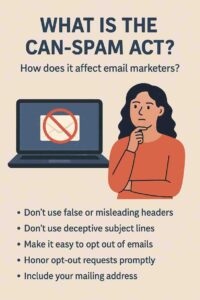
Students must comply with email regulations like GDPR, CAN-SPAM, and CASL to avoid penalties and maintain trust. Key steps:
- Use double opt-in to confirm consent.
- Include an unsubscribe link in every email.
- Provide a physical address in the footer (e.g., a university address).
- Avoid misleading subject lines or content.
Compliance builds credibility and protects against legal risks, such as GDPR fines up to €20 million.
Common Pitfalls to Avoid
- Overloading with Promotions: Too many sales-driven emails can alienate subscribers. Aim for an 80% value, 20% promotion ratio.
- Ignoring Mobile Optimization: Unreadable emails on mobile devices frustrate 46% of users, per Litmus.
- Neglecting Testing: Failing to test subject lines or content can miss opportunities to improve engagement.
- Being Too Formal: A stiff tone can feel impersonal, reducing connection.
- Inconsistent Sending: Irregular emails can cause subscribers to forget your brand, lowering engagement.
Best Practices for Students
- Start Simple: Begin with a welcome email and weekly newsletter, scaling to automation as you grow.
- Use Free Tools: Platforms like Mailchimp or MailerLite offer free plans with templates and analytics.
- Batch Content Creation: Write multiple emails at once to save time, scheduling them via your platform.
- Leverage Analytics: Track open rates (target: 20-30%), click-through rates (target: 5-10%), and unsubscribes (target: <0.5%) to refine content.
- Seek Feedback: Ask subscribers via surveys or replies what content they want, enhancing relevance.
Example of Engaging Email Content by a Student
Scenario:
Noah, a junior computer science student, runs a YouTube channel, “Code with Noah,” where he shares beginner-friendly coding tutorials. He’s building an email list to drive channel views and promote a planned Python course. Using MailerLite’s free plan, Noah crafts engaging emails to connect with his audience of students and aspiring developers.
Implementation:
- Audience and Goals:
- Audience: College students, coding beginners, and career switchers.
- Goals: Increase YouTube views, build trust, and pre-sell his Python course.
- Signup Form:
- Noah’s blog features a signup form: “Join Code with Noah for Weekly Coding Tips!” It offers a lead magnet, “10 Must-Know Python Tricks for Beginners,” and uses double opt-in.
- The form includes a privacy statement and is promoted on his YouTube channel, Instagram, and university coding club.
- Email Content:
- Welcome Email:
- Subject Line: “Your Free Python Tricks Are Here, [Name]!”
- Body (200 words):
Hi [Name],
I’m Noah, and I’m stoked you’ve joined Code with Noah! As a fellow student, I know learning to code can feel like debugging a 500-line error at 2 AM. That’s why I created this free guide, “10 Must-Know Python Tricks for Beginners,” to make your journey smoother.
[Download Your Guide] Expect weekly emails every Tuesday with bite-sized coding tips, my latest YouTube tutorials, and a few laughs (because coding needs humor). Next week, I’ll share how I fixed a Python bug that nearly crashed my project—trust me, it’s relatable!
Got a coding question? Reply and let me know what’s tripping you up.
Happy coding,
Noah
P.S. Check out my latest video on Python loops—it’s saved me hours! [Watch Now] Update preferences [here] or [unsubscribe]. - Structure: Conversational tone, short paragraphs, one CTA (download guide), secondary CTA (watch video), emojis for visual appeal.
- Weekly Newsletter:
- Subject Line: “This Python Tip Saved My Project (Plus a New Video!)”
- Body (250 words):
Hey [Name],
Ever had a Python script crash and burn right before a deadline? Been there. This week, I’m sharing a debugging tip that saved my last project: using try-except blocks to catch errors. Check out my new YouTube video where I walk through it step-by-step—it’s only 5 minutes!
[Watch the Video] Here’s a quick preview:- Why try-except is your error-proofing BFF.
- How to spot sneaky bugs in 3 lines of code.
- A real example from my latest homework (yep, it was messy).
Want more? I’m working on a Python course for beginners, launching next month. Reply with “I’m in!” to get early access details. No pressure, just nerdy coding vibes here.
What’s your biggest coding struggle? Hit reply—I love geeking out over this stuff.
Catch you next Tuesday,
Noah
Update preferences [here] or [unsubscribe].
- Structure: Story-driven hook, bullet points, one CTA (watch video), soft promotion, conversational tone.
- Welcome Email:
- Technical Setup:
- Noah uses MailerLite’s drag-and-drop editor for mobile-friendly designs.
- He configures SPF and DKIM for deliverability and tests emails across Gmail and Outlook.
- Automation delivers the welcome email instantly, with newsletters scheduled for Tuesdays.
- Monitoring:
- Noah tracks open rates (target: 25%), click-through rates (target: 8%), and unsubscribes (target: <0.3%).
- He tests subject lines (e.g., “Python Tip of the Week” vs. “This Python Trick Rocks!”) to boost opens by 15%.
Outcome:
- After two months, Noah grows his list to 300 subscribers, with a 32% open rate and 10% click-through rate.
- The welcome email drives 50% of subscribers to download the guide and 20% to watch a video.
- Weekly newsletters increase YouTube views by 25%, and 30 subscribers reply with course interest.
- Zero spam complaints and a 0.2% unsubscribe rate reflect high engagement, proving the content’s effectiveness.
Conclusion
Students can write engaging email content by understanding their audience, crafting compelling subject lines, using a conversational tone, delivering value, and structuring emails for readability. Personalization, storytelling, and strategic CTAs further enhance engagement, while compliance ensures trust and legality. Despite challenges like time constraints or inexperience, leveraging free tools, automation, and analytics makes the process accessible. Noah’s example shows how a student can create relatable, value-driven emails to grow an audience and achieve goals. By focusing on quality and optimization, students can turn emails into a powerful tool for connection, branding, and success in their academic and professional journeys.